Web app
A real product on the real internet
Take it from an empty folder to a live site people can use.
Mastering Agentic Coding · for no-coders and builders
One person and a team of AI agents, building what used to take a whole dev team. Learn to direct coding agents and check their work, then watch complete apps get built in front of you.
Start building · $147Lifetime access · 30-day build-it guarantee
Start for free with OpenCode and its free models. Works with whichever coding agent you use.
Use the agent you like
You learn a workflow, not one tool’s buttons. I teach it in OpenCode, and it works the same in all of these.
You type your idea. A few minutes later there’s a working screen. It feels like magic.
Then you ask for one more thing.
The models are good enough now. What’s missing is the workflow around them. People who get real apps out of AI coding agents work differently. They know what they’re building, they check what comes back, and every build teaches them something for the next one.
That’s the new way. Most people who have it learned it the hard way.
This course teaches it to you in order, one lesson at a time.
Your new job
An AI coding agent is the fastest builder you’ll ever work with. It’s also a bit like a junior developer. It makes mistakes, it invents things, it forgets what you told it, it changes things you never asked it to touch, and it says it’s done when it isn’t. You’ll learn how to catch all of it and stop it from coming back.
Here’s the loop you’ll run on every build:
Know exactly what you’re building before the agent starts.
Get the agent to build what you actually asked for.
Find the problems before your users do.
Every mistake makes your next build better.
Put it online so real people can use it.
You don’t need to write the code by hand. You need to know what to ask for, what to check, and what to do next.
Why most builds stall
One prompt can get you something that looks finished. Then you look closer. A real app takes a lot of decisions, one prompt only covers a few, and the agent guesses the rest.
Nobody writes the perfect prompt. Real apps get built by steering: say what you want, check what comes back, and correct course until it’s right. That’s the skill this course teaches.
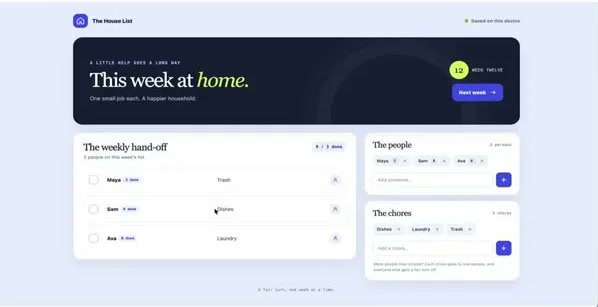
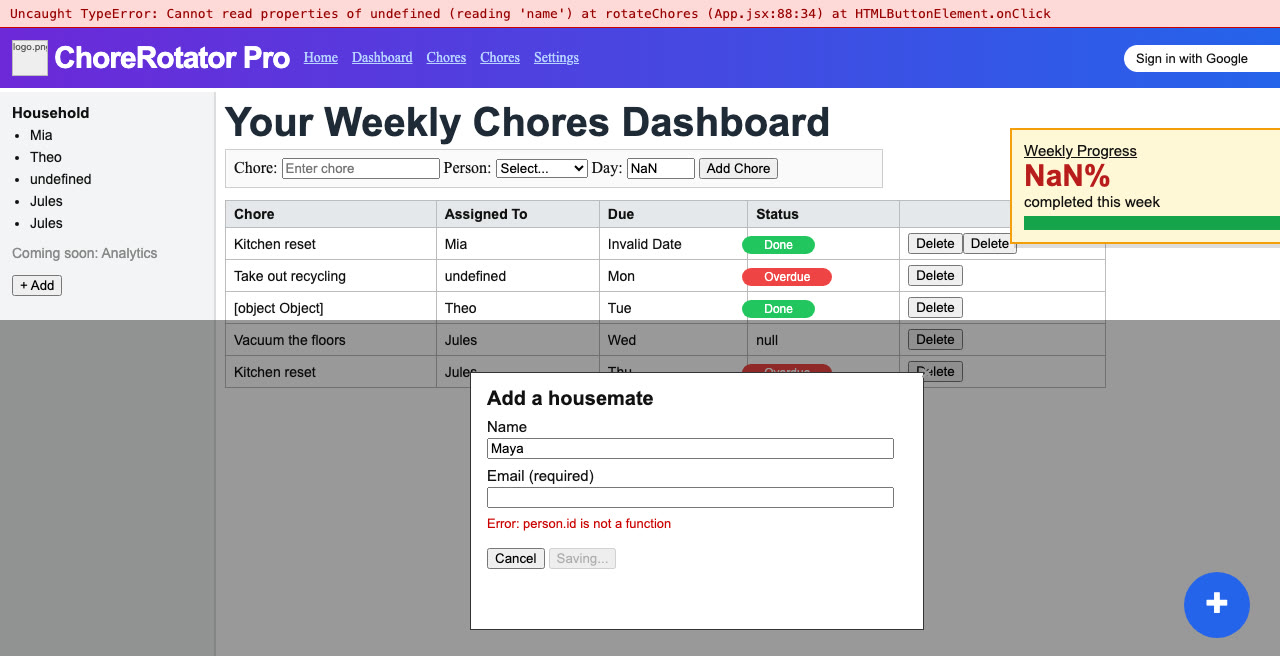
Same app, two prompts
Most people give the agent one line and hope for the best. The new way takes a little more thought up front, and what comes back is what you actually wanted.
Make the agent work for you
That’s how one person keeps up with a team. The project remembers the rules, so you don’t have to.
Lifetime access · 30-day build-it guarantee
Build apps the right way from the ground up
These aren’t to-do lists. You watch me build very different kinds of apps, start to finish, with every prompt included. Then you take the same way of working and build whatever you have in mind. It’s real code and it’s yours. No platform to outgrow, and nothing locking you in.
Web app
Take it from an empty folder to a live site people can use.
iPhone app
Built for the phone, using the things only a phone can do.
Bot
It works for you in the background, even after you close your laptop.
In-browser app
It works right on top of the sites you already use.
Every app ends with an Extend It challenge: a written task with a checklist of what “done” looks like, so you build the next feature yourself.
Every prompt included.

I’m a former Silicon Valley software engineer. I started coding at 12, with Visual Basic and Pascal. Years later, I went all-in on no-code and taught it to 57,000+ subscribers on YouTube and 1,000+ students in my FlutterFlow, Supabase and BuildShip courses.
When AI coding agents arrived, I used them the old way and hit the same wall you’re hitting. Great first hour. Then the rewrites, the “Done!” that wasn’t, the usage that vanished.
So I spent 2,000+ hours working out the new way: what to ask for, what to check, and what to make the project remember. This course is that workflow, in order, with every prompt I used.
I usually avoid anything backend-related, but this showed me how to approach it step by step. Still not my favorite part, but at least now I can build what I need.
Carla · Mastering BuildShip student
I’m still figuring things out, but this gave me a clear mental model for how apps should work under the hood. It’s helping me avoid bad architecture early on.
Richard · Mastering BuildShip student
Clear explanations, no fluff. I’ve used some of the techniques from James’ lessons in two client projects already.
Jonas · Mastering BuildShip student
I’m not a techy person, but thanks to James’ teachings and nocode tools, I have the confidence and ability to build apps.
Gene H. · Mastering FlutterFlow student
The path
Lifetime access, updates included.
You’ve built with FlutterFlow, Bubble, BuildShip or Supabase, and you keep hitting the edge of what they can do.
You don’t want to become a programmer. You do want to learn enough about how apps work to direct an agent well.
You’ve tried Cursor, Claude Code, Codex or Lovable, and you got stuck between a good demo and a working app.
You have a product to get out, and hiring or waiting on a developer keeps slowing you down.
Your clients want more than you can deliver alone, and you want to take on bigger builds without hiring.
You can code, but you’re using agents like a faster autocomplete. You want them doing real work you can trust.
The offer
Every lesson · every prompt · community · future updates · lifetime access
No other subscriptions needed to start.
Start building · $147Take the course, put in an honest effort and build with it. If it doesn’t work out for you, ask for a refund within 30 days.
See the refund policy for the details.
No. I teach this as a builder, not a programmer. You learn enough about how apps work to direct the agent and check its work. You don't write the code by hand.
The videos are in English, with subtitles you can turn on in English, Spanish, French, German, Portuguese, Russian, Turkish and Arabic.
I teach it in OpenCode, a free, open-source coding agent. Everything here (the planning, the prompts, the checks, the rules and skills) works the same in Claude Code, Codex, Cursor or whatever you use. A future update will cover what's different in specific agents.
OpenCode is free and comes with a few free models, so you can follow along without paying for anything. (The free models change often, so check OpenCode's list when you start.) For bigger builds you'll want a stronger model, billed by your model provider. That can be pay per use or a subscription you may already have. Model costs aren't part of the course price.
Go at your own pace. Each lesson stands on its own, and each app is split into short lessons you can do one evening at a time.
The videos show one thing at a time. The course teaches one workflow in order, from your first prompt to finished apps, with every prompt included and a challenge after each app.
While the tools may change, the concepts taught here will not. The new way is a way of working, so it carries over to whatever tool comes next. And you get free updates for life.
No. Patreon and this course are separate. Buying one doesn't give you the other.
Yes. Course members can message me inside the course area or email [email protected].
You can keep building the old way: another demo, another project, the same wall at 80%.
Or you can learn the new way once and use it on everything you build from now on.
The agents are ready. Learn the new way to work with them.
Every prompt · lifetime access · 30-day build-it guarantee